
What is Email to SMS and Why Does it Matter?
In 2026, Email to SMS serves as a vital communication bridge that allows businesses to send text messages using their standard email clients like Outlook or Gmail. By simply sending an email to a unique address, formatted as [email protected], the system automatically converts the text body into an SMS for mobile delivery. In Malaysia, this technology is primarily utilised for automated server alerts, rapid OTP (One-Time Password) delivery, and customer support notifications, providing a streamlined way to reach users without requiring complex API development or specialised software training.
Bridging the Gap: The Utility of Email to SMS in Malaysia
While many businesses focus on fancy apps, the most efficient operations often rely on the tools they already have. For a company based in Malaysia, the ability to trigger a text message from a standard email is a game-changer for productivity.
Instead of opening a separate portal to send a single notification, a logistics coordinator or a security officer can simply “Email” the alert. The recipient receives a standard SMS on their mobile device, ensuring the message is seen instantly even without an active data connection.
The “Silent” Power of SMTP
Email to SMS works via the Simple Mail Transfer Protocol (SMTP). This means it isn’t just for humans; your software can use it too. Any system that can send an automated email (like a website’s contact form or a network monitor) can now send a text message to your phone.
Note: SMTP and SMPP, another messaging protocol, work differently. While SMTP is great for email-to-text, SMPP is designed specifically for high-volume, real-time SMS messaging.
Key Use Cases for the Malaysian Market
1. High-Priority IT & Security Alerts
If a server goes down or a security breach is detected at 3:00 AM, an email might sit in an inbox unread. By routing that alert through an Email to SMS gateway, the technician receives an audible text alert, ensuring immediate action.
2. Seamless Customer Support
Support teams often work exclusively within an email-based ticketing system. With Email to SMS, they can reply to a customer’s query via email, and the customer receives the response as a text. This “two-way” capability keeps the conversation moving without forcing the customer to check their inbox.
3. Instant OTP for Web Portals
While many use APIs for authentication, smaller Malaysian startups or internal corporate portals often use Email to SMS to send OTP codes. It is a low-cost, high-reliability method to ensure only authorised users access sensitive data.
2026 MCMC Compliance: What You Need to Know
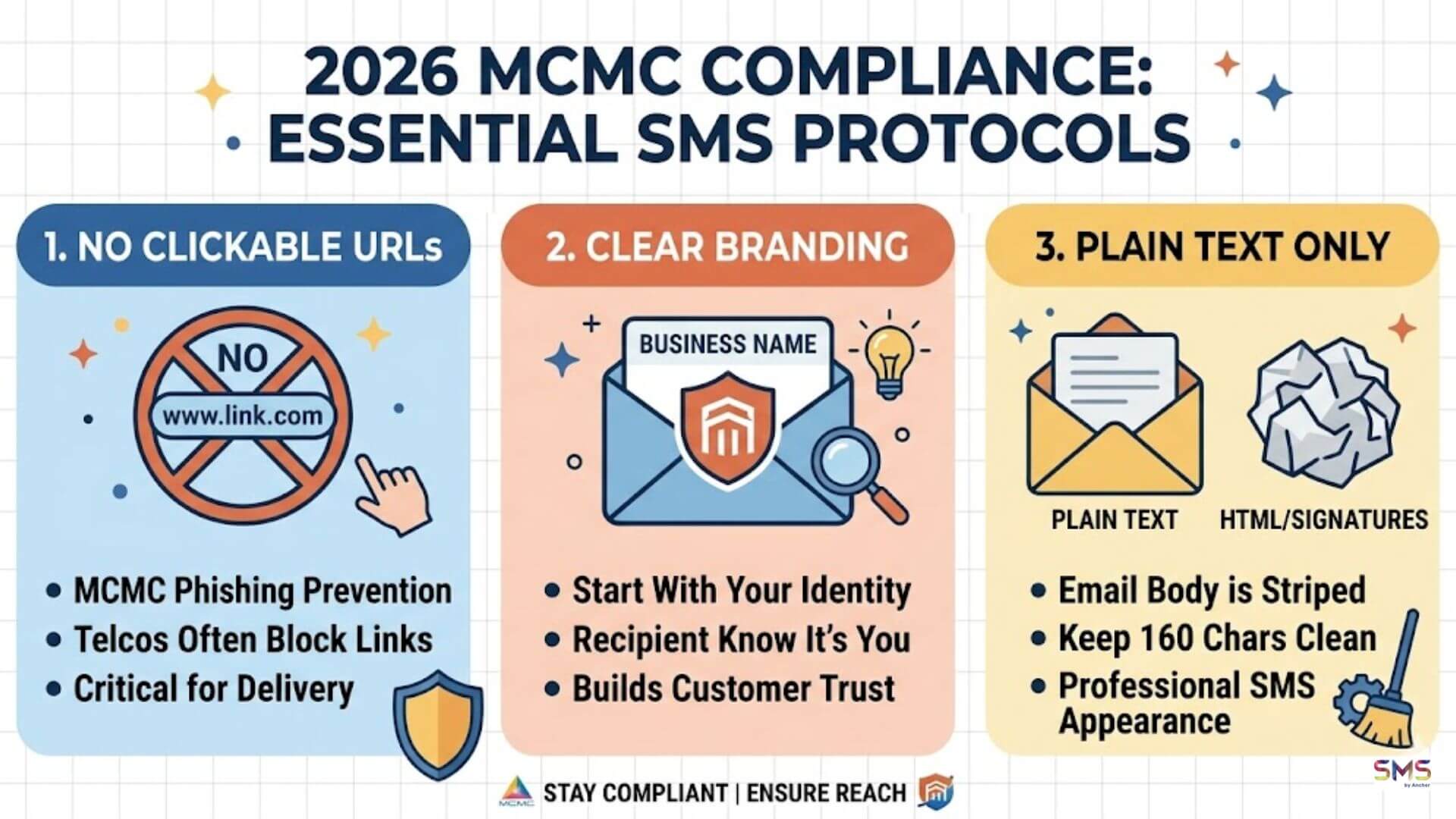
The Malaysian Communications and Multimedia Commission (MCMC) continues to prioritise user safety. When using Email to SMS for your business, you must follow these specific protocols:
- No “URL” Policy: Avoid placing clickable links in your SMS body. To prevent phishing, Malaysian telcos often block messages containing suspicious links.
- Clear Branding: The message must start with your business name or a clear identifier so the recipient knows exactly who is contacting them.
- Plain Text Only: While your email can have fancy signatures and HTML, the gateway will strip all of that away. Keep your email body clean to ensure the 160-character SMS looks professional.
Further reading: MCMC SMS Regulations 2026 (Guide for Malaysian Businesses)
Technical Comparison: Why Not Just Use an App?
Feature | Email to SMS | Mobile Messaging Apps |
Internet Requirement | Required for sender only | Required for both parties |
Recipient Device | Any mobile phone (2G/3G/4G/5G) | Smartphone only |
Integration Effort | Zero (Standard Email) | High (API/App Install) |
Open Rates | 98% (Standard for SMS) | Variable (Varies by app usage) |
Implementation: Setting Up Your Gateway
Setting up is generally a three-step process for Malaysian businesses:
- Whitelist your domain: You tell your service provider which email addresses (e.g., @yourcompany.com.my) are authorised to send messages.
- Format your message: Write your message in the email body, keeping it concise.
- Send: Address it to the recipient’s mobile number using the provider’s specific domain extension.
This simplicity is why Email to SMS remains a staple for professional communication in 2026, despite the rise of social messaging platforms.
Conclusion
Email to SMS is the ultimate “hidden” productivity tool for the modern Malaysian enterprise. It combines the ubiquity of email with the urgency of a text message, creating a communication channel that is both easy to manage and impossible to ignore. For businesses looking to scale their notifications without scaling their technical complexity, it is an indispensable solution.
Ready to modernise your messaging? Our platform offers robust SMS blasting, bulk SMS, and secure OTP services designed to integrate perfectly with your current email setup. Talk to our experts today and see how we can help your Malaysian business reach its customers faster and more reliably.