
The “Green Tick” is officially a relic. If you’ve been scouring the web for a way to get that iconic green badge next to your business name, you’re looking at yesterday’s news. As of 2026, Meta has unified its verification across Facebook, Instagram, and WhatsApp, meaning that coveted checkmark is now Blue.
For many local business owners, the “tick” has always felt like an exclusive club reserved for the big-box retailers and giant telcos. You’ve likely felt the sting of a “Verification Rejected” email or found the process more confusing than a weekend crowd at Mid Valley. But here’s the good news: the shift to Blue hasn’t just changed the color; it’s opened the doors for SMEs to finally prove their legitimacy without needing a million-ringgit PR budget.
In this guide, we’ll break down how to secure your badge, why your SMS strategy is the secret weapon to passing verification, and how to stay ahead of competitors who are still stuck in 2023.
Key Takeaways
- The Blue Shift: In 2026, the legacy WhatsApp “Green Tick” has been replaced by a Blue Verified Badge to align with Meta’s global ecosystem.
- Two Paths to Verification: Businesses can now choose between the Official Business Account (OBA) for established brands or the Meta Verified Subscription for growing SMEs.
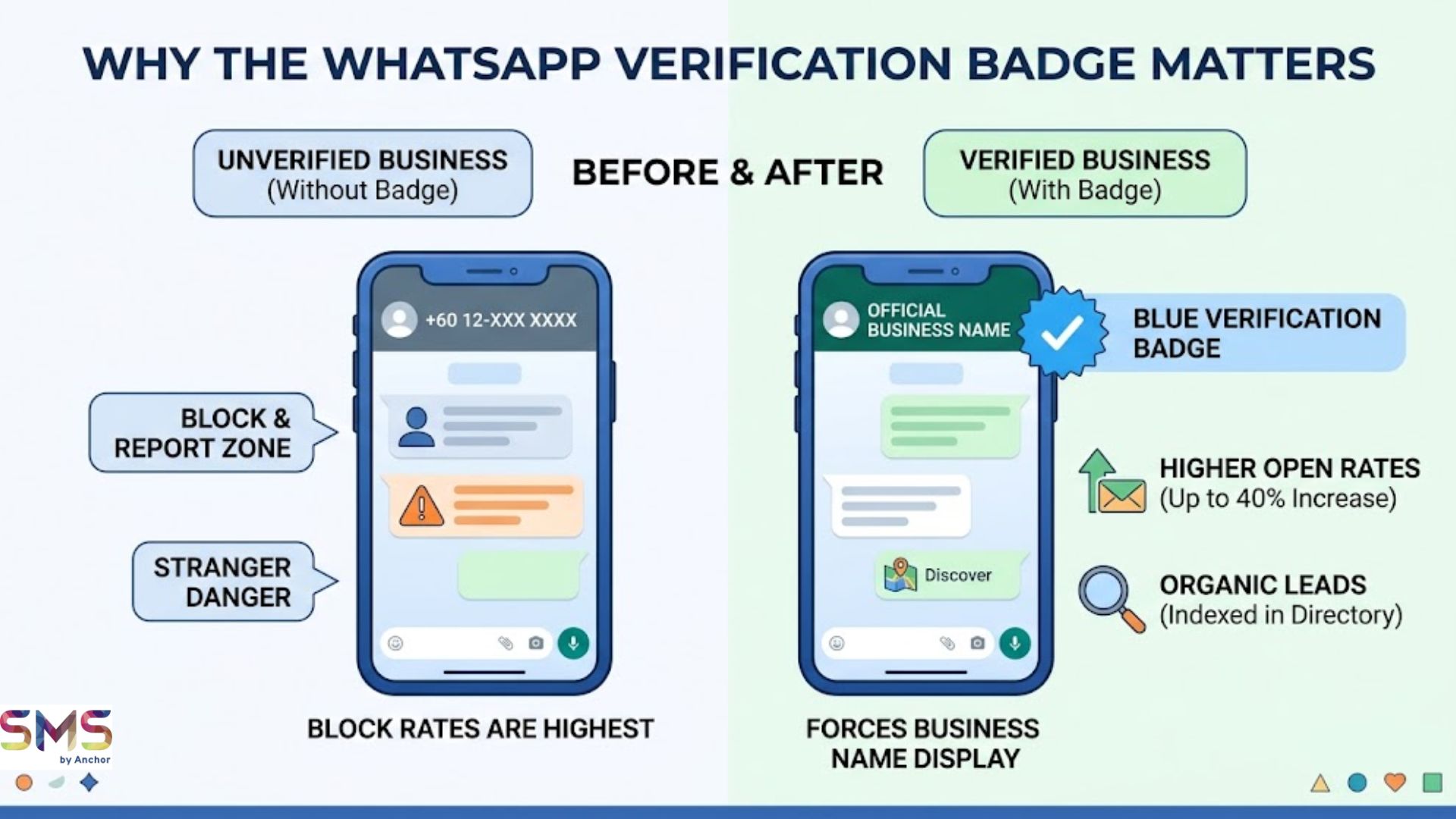
- Trust as Currency: A verified badge reduces “Block Rates” and ensures your business name is visible even if the customer hasn’t saved your number.
- The Hybrid Advantage: High-performing businesses use SMS for critical alerts (OTP/Urgent notifications) and WhatsApp for conversational marketing and support.
- Verification Requirements: Success requires a verified Meta Business Manager, 2-Step Verification, and a display name that strictly matches legal branding.
Comparison: Legacy Green Tick vs. New Meta Verified (Blue)
Feature | Legacy Green Tick (OBA) | Meta Verified (Subscription) |
Badge Color | Green (Discontinued) | Blue (Current Standard) |
Cost | Free (But hard to get) | Monthly Subscription |
Primary Requirement | High Brand “Notability” | Legal ID & Business Docs |
Best For | Famous Public Brands | Growing SMEs & Personal Brands |
Support | Standard | Priority Account Support |
Impersonation Protection | Basic | Advanced Monitoring |
Why Does the Verification Badge Actually Matter?
It’s not just about looking “pro”, it’s about the “Saved Contact” hurdle. Normally, when you message a customer on WhatsApp for the first time, they see a random phone number (e.g., +60 12-XXX XXXX). This is the “Stranger Danger” zone where block rates are highest.
A Verified Blue Badge forces WhatsApp to display your Official Business Name immediately, even if the user has never heard of you. This single change can increase your message open rates by up to 40%. Furthermore, verified accounts are indexed in the WhatsApp Business Directory, allowing locals to find your services via the “Discover” tab, a goldmine for organic leads.
How Do I Qualify for the Blue Tick in 2026?
Meta has streamlined the process into two distinct routes.
Path A: The “Meta Verified” Subscription
Ideal for the local boutique, the neighborhood dental clinic, or the growing e-commerce brand. This is a “Pay-to-Play” model that guarantees a badge if you pass the security checks.
- The Check: You must provide legal documents (SSM registration, utility bills) and a government-issued ID.
- The Tech: You must have 2-Step Verification
- The Benefit: Beyond the badge, you get impersonation protection and the ability to link up to 10 devices to one number.
Path B: The Official Business Account (OBA)
This remains the “Elite” tier. It is free but requires you to prove your brand is “Notable.”
- The “Notability” Gap: Meta looks for 3–5 organic news mentions in reputable outlets (think The Star, Malay Mail, or TechInAsia).
- What Doesn’t Count: Paid press releases, Facebook Ads, or your own blog posts. Meta’s AI is now smart enough to filter out “bought” fame.
The Role of SMS in Your Verification Journey
Wait, why are we talking about SMS in a WhatsApp guide?
Because SMS is the foundation of trust. To even begin the WhatsApp verification process, Meta sends a 6-digit verification code to your business number. If your SMS routing is unreliable or blocked by your carrier, your verification fails before it even starts.
Moreover, savvy businesses are using a Hybrid Messaging Strategy:
- SMS for the “Hook”: Use a reliable SMS service provider for high-priority alerts like OTPs (One-Time Passwords) or “Your order is ready” notifications. SMS has a 98% open rate and doesn’t require an internet connection.
- WhatsApp for the “Conversation”: Once the trust is established via a verified SMS alert, move the customer to your Verified WhatsApp for rich media support, catalog browsing, and AI-driven chatbots.
“A message is only as good as its delivery. We’ve seen businesses fail verification simply because their SMS gateway couldn’t deliver the Meta handshake code. Fix your SMS, and you fix your entry point.” — SMS by Anchor
Still unsure if your business is “Tick-Ready”?
The biggest mistake SMEs make is applying too early and getting a “Cooling Off” ban. If you’re ready to professionalise your outreach, start with a robust communication backbone. Explore our SMS Marketing & API Solutions to secure your business identity today.
Common Reasons for Verification Rejection (And How to Avoid Them)
Don’t let these “Small Mistakes” kill your application.
- Display Name Mismatch: If your SSM says “ABC Sdn Bhd” but your WhatsApp name is “ABC Awesome Deals,” Meta will reject you. Your display name must be a clear representation of your legal or brand identity.
- The “Gmail” Trap: Applying with a [email protected] address is a red flag. Use a professional domain email (e.g., [email protected]).
- Low Messaging Tier: If you’ve just started your WhatsApp API journey, Meta may want to see a history of “High Quality” interactions. Send valuable content, not spam, to keep your quality rating in the “Green” (even if your badge is Blue!).
Maximising Your Verified Status
Once you have the badge, don’t just sit on it.
- Update Your Ads: Use “Click-to-WhatsApp” ads. Verified accounts see a significantly lower Cost-Per-Lead (CPL) because the badge appears in the ad preview.
- Leverage WhatsApp Flows: Use your verified status to build mini-apps inside the chat for bookings or surveys.
- Sync with SMS: Use your SMS service to “nudge” users toward your verified WhatsApp channel for exclusive loyalty rewards.
The Future of Your Business Messaging
The move from Green to Blue is more than a paint job. it’s a shift toward a safer, more transparent digital marketplace. By securing your verification and backing it up with a professional SMS Marketing strategy, you aren’t just following a trend; you’re building a moat around your brand.
Ready to upgrade your customer communication? Whether it’s high-speed SMS delivery or scaling your WhatsApp presence, we’ve got the tools to help you lead the pack.